Garment swap
AI clothes changer for fashion brands
Same person. New garment.
Misu changes what someone is wearing and keeps everything else: the face, the pose, the light. Use your own garments, on a person who has agreed to it or on a model from the library.

01
What an AI clothes changer does for a brand
An AI clothes changer takes a photo of a person and a photo of a garment, and returns the person wearing that garment. The pose stays, the setting stays, the face stays. Only the clothes change.
Most free clothes changers are built for a single selfie. Misu is built for the other side of the counter. The garment is yours, from your catalogue. The person is a model you shot, a founder in their own product, or a model from Misu's library. The output is a photograph you can put on a product page, in a lookbook or in an ad, with full commercial rights.
That is the difference between a toy and a production step. A brand that needs the same shirt in six colours, or a late sample on a body before the shoot is booked, does not need a filter. It needs the fit, the folds and the shadows a worn garment really has, on the same face every time.
02
How to change the clothes in a photo
Two routes, depending on who should wear the garment.
01
Start from the garment
One clear photo of it, flat, on a hanger or as a packshot. Whatever the render should reproduce, pockets, buttons, prints, has to be visible in the frame.
02
Choose who wears it
Upload a photo of a person who has agreed to it, or pick a model from the Wardrobe library. A photo keeps that person's pose and setting. A library model lets you set the pose, the backdrop, the hair and the makeup.
03
Run it
Connect the garment and the person, check the token quote, and confirm. Nothing is charged for a run you haven't confirmed. A typical Flat-lay to Model run takes about 15 seconds.
04
Change it again
Swap the garment and run again on the same person. Save the results to your Library, change the background, or animate the still in Video Studio.
03
What stays, and what changes
The person stays
Identity, facial structure, body and skin tone carry over. Hair and makeup change only if you choose a new style.
The garment is yours
Pieces come from your own catalogue, so the pocket, the seam and the print are the ones you sell, not a lookalike.
A whole outfit
Wardrobe applies an outfit or separates with outerwear, shoes and several accessories in one render. The Flat-lay to Model technique handles one garment at a time.
Pose and backdrop
On a library model, choose from six poses and six backdrops. On a person photo, the original pose and setting are kept.
Leather, fur, fitted cuts
If a safety filter flags ordinary garment material, the render retries on a second model automatically, instead of failing on a leather jacket.
Rights included
Every plan includes full commercial rights to every generated asset, worldwide.
04
A free clothes changer or a studio tool
Both change the clothes in a photo. They answer different briefs.
- Built for
- Free clothes changer appsOne-off fun with a selfie
- MisuA catalogue that has to look consistent
- Garment comes from
- Free clothes changer appsAny image, often a lookalike
- MisuYour own products
- The same face across a range
- Free clothes changer appsNot the aim
- MisuYes, one person or model across every garment
- Pieces per render
- Free clothes changer appsUsually one
- MisuA full outfit in Wardrobe, one garment in the technique
- What you can do with the result
- Free clothes changer appsCheck the terms
- MisuFull commercial rights on every plan
| Criteria | Free clothes changer apps | Misu |
|---|---|---|
| Built for | One-off fun with a selfie | A catalogue that has to look consistent |
| Garment comes from | Any image, often a lookalike | Your own products |
| The same face across a range | Not the aim | Yes, one person or model across every garment |
| Pieces per render | Usually one | A full outfit in Wardrobe, one garment in the technique |
| What you can do with the result | Check the terms | Full commercial rights on every plan |
05
From the hanger to a model
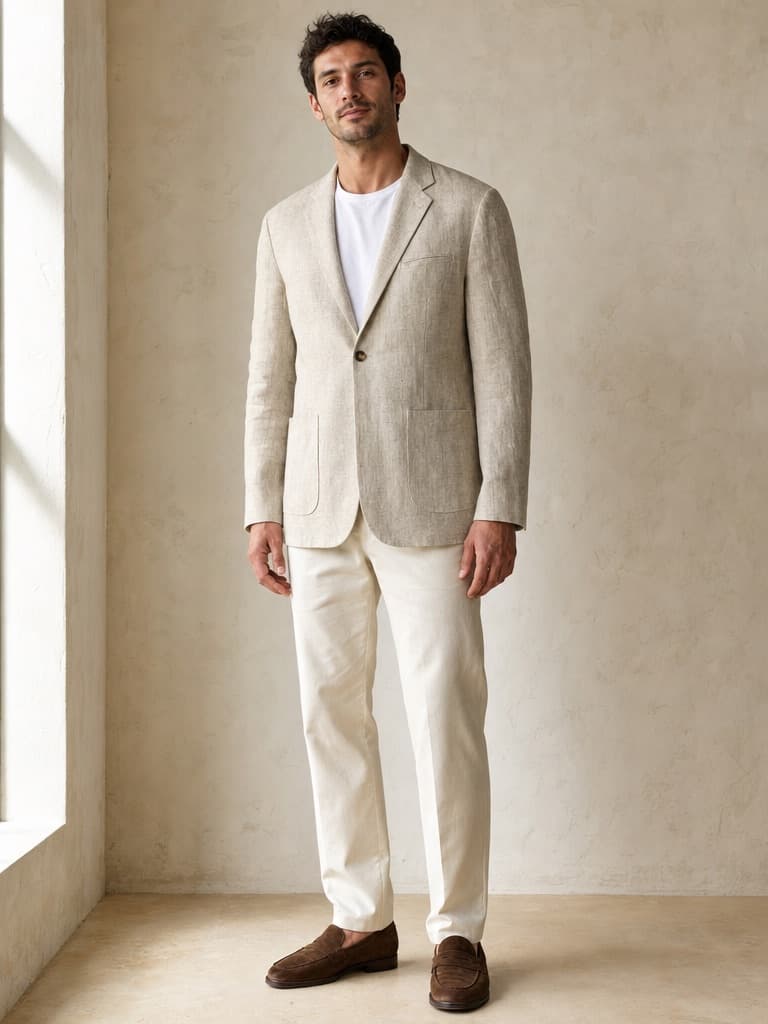
The hanger photo went into Misu with a short written brief for the model and the styling. What came back is the same blazer: one button, a welt chest pocket and rounded patch pockets, in the same slub linen.
In

Out · generated in Misu
06
Made for your own garments, and for people who agreed
Misu is a studio for brands, and it works on garments a brand owns. The person photo matters as much as the garment photo. Use a photo of someone who has agreed to it: a model you have booked, a founder, a member of your team.
If you do not have a person to dress, you do not need one. Wardrobe's library models, and the licensed Main Board, exist so a collection can be worn by a consistent, cast face without a shoot.
07
One garment photo, many frames
A blazer shot on its own, and the on-model images made from that suit in Misu.


08
Questions people ask
What is an AI clothes changer?
A tool that takes a photo of a person and a photo of a garment and returns the person wearing that garment, with their pose, face and setting kept. Misu's version is built for fashion brands working with their own garments.
How do I change the clothes on a person in a photo?
Run the Flat-lay to Model technique with two images: the garment and the person. Or add the garment as a product and dress a library model in Wardrobe. Either way you confirm a token quote before anything is charged.
Can I change the clothes on a photo of anyone?
Only use photos of people who have agreed to it. Misu is built for brands dressing their own models, founders and team, or a model from the library, not for editing strangers' photos.
Does the face change when the clothes do?
No. The render keeps the person's identity, facial structure, body and skin tone. Hair and makeup only change when you choose a new style.
Can it change more than one piece at a time?
In Wardrobe, yes: an outfit or separates with outerwear, socks, shoes and several accessories, all in one render. The Flat-lay to Model technique handles one garment per run.
How much does it cost?
The Flat-lay to Model technique costs about 84 tokens a run today, roughly €0.42, with the exact quote shown before you confirm. Generating starts on the Starter plan at €29 a month.
Is there a free AI clothes changer?
Misu has no free generating tier. Plans start at €29 a month on Starter. If you only want to try a garment on a selfie, a free app will do that. Misu is for photography you publish.
Who owns the images?
You do. Every plan includes full commercial rights to every generated asset, worldwide.
Get started
Your product.
The same face in every shot.
Full commercial rights · Licensed models · Stockholm
Misu is in beta and open to brands, agencies, freelancers and designers. We review every request and email your invite once it's approved, and every new studio starts with welcome credits.
BETA · REVIEWED BY HAND · FOUNDING PRICING LOCKED