MCP connector · Claude
A Claude image generator for fashion brands
Brief it in the chat. The studio shoots it.
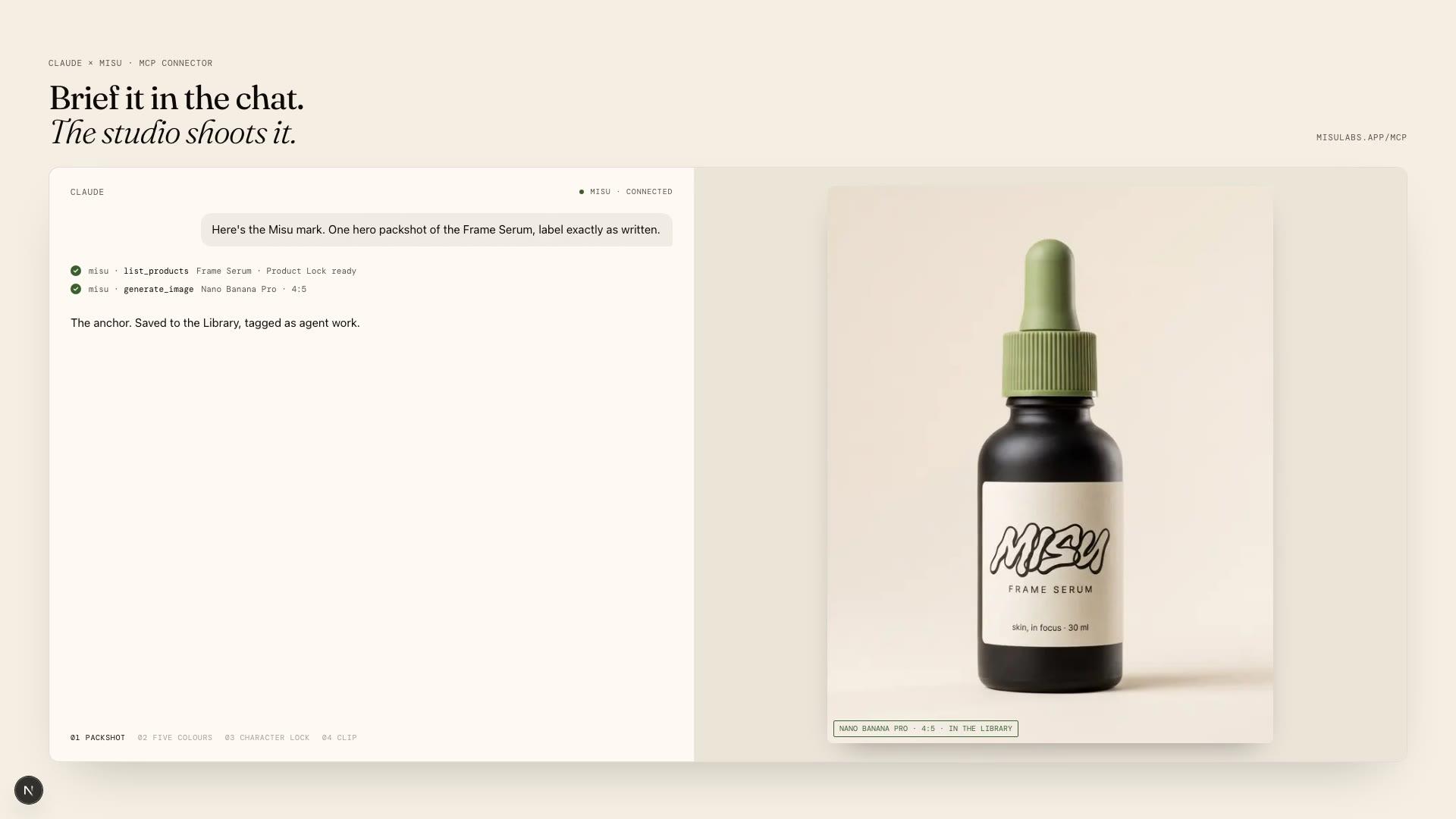
Claude writes the brief. Misu renders the frame. Connect the two once and a conversation can shoot from your own catalogue, with your own cast, paid from your brand's credits.
01
Can Claude generate images?
Not photographs, on its own. Claude is a writer and a planner. What it can do is call a tool that renders, and that is what a connector is. Misu ships one, built on MCP, the open protocol Claude uses to talk to outside tools.
Once Misu is connected, Claude can read your brands, products, trained characters and saved Looks, check your credit balance, quote a job, and ask Misu to render stills, sets, clips and 3D models. The render runs on the same engine as the Studio in the browser: the same model routing, the same product references, the same Character Lock, the same credit ledger and the same refunds.
The difference from a general picture tool is what the chat can see. Claude passes a product id, not a description of a bag. The product's reference photo and any trained lock travel with the request, so the frame shows the bag you sell and not one that resembles it.
02
Connect Misu to Claude
It works in Claude on the web, in the desktop and mobile apps, and in Cowork. There is no API key. You sign in with the Misu account you already have.
01
Copy the connector URL
In Misu, open Settings, then Connections. The URL is there with a copy button. It is also on the MCP page of this site.
02
Add a custom connector
In Claude, open Settings, then Connectors, then Add custom connector. Name it Misu and paste the URL.
03
Sign in and approve
Claude sends you to Misu. Sign in, read the consent screen, which names what the connection can do and where you will be sent back, and approve.
04
Ask for a shot
Start a chat and ask Claude to list your Misu brands. From there, brief a frame the way you would brief a photographer.
03
What Claude can do with your brand
The connector carries thirty-three tools. Most of them read. A few render, and those are the ones that spend.
Read the catalogue
Brands, products, trained characters and saved Looks, with their ids. Claude also sees which products are locked and ready.
Quote before it spends
One call returns the credits for a planned set or a clip, next to your balance. Nothing is submitted and nothing is charged.
Shoot a still or a set
One frame at a time, or up to eight different frames in one batch, each with its own prompt, product, character and Look.
Animate a still
A clip from an image you made or one from the Library. Video returns a job at once and Claude checks on it until the clip is ready, usually one to four minutes.
Work from references
Search the Scenes library of film and campaign frames, build a moodboard, have it read into a written direction, and render from it.
Use your own photo
Claude asks Misu for an upload link. You drop the file in, and it becomes something Misu can render from.
04
What to type, and what comes back
Six workflows ship with the connector and sit in Claude's prompt menu. Each plans the frames, quotes the cost, waits for your yes, renders, and reports back. These are the kind of requests they answer.
"Make a packshot set for our tan crossbody: white background front and three-quarter, a close detail, and one lifestyle frame."
Claude finds the product, plans four frames at 4:5, quotes the credits and waits. On your yes it renders the four in one batch and returns a short table: frame, status, link, credits spent.
"Show the linen shirt in sand, olive and navy, same angle and light in every frame."
One base prompt, one seed, only the colour changes per row. You get one link per colour, in the order you gave them, with any frame Misu's own check suggests re-rolling flagged.
"Shoot a four-frame campaign with our character wearing the new jacket, same face in every shot."
Claude writes a shot list first: full body, bust, walking, detail. After your OK it renders with the character and the product attached, and reports the identity check for each frame.
"Animate my latest image into a five-second clip for Instagram."
Claude agrees the motion and the model with you, runs a dry run to get the price, and only then submits. You get the clip link, the model, the length and what it cost.
"Go through our last ten images and tell me which ones are off-brand."
A free read. Claude compares recent renders with your saved Look and Misu's quality scores, and returns keep, fix or drop with a one-line reason. Nothing is rendered unless you ask.
05
What is free, and what spends credits
Reading is free. Brands, products, characters, Looks, balance, quotes, job status and Library browsing never cost anything. Rendering spends the brand's credits at Studio rates: an image is typically 4 to 120 credits depending on model and quality, and a clip costs more. Having a moodboard read into a direction costs a few credits. A failed render refunds itself.
There are ceilings so a conversation cannot run away with a balance. A batch is at most eight frames, and one that would cost more than 1,500 credits is refused before anything is charged. A single video call is refused above 3,000 credits unless you tell Claude to raise the limit.
Permissions carry over. Every tool runs on your own Misu session, so Claude reaches exactly the brands your account can reach. A teammate who cannot spend in the Studio cannot spend from a chat either. Everything Claude makes lands in the brand's Library, tagged as agent work.
06
MCP or the Studio
Same engine, same credits, same Library. They suit different moments.
- Best for
- In ClaudeBriefing in words, planning a set, repeat jobs
- In the StudioLooking, comparing, fine control
- Stills and sets
- In ClaudeYes, up to eight frames per batch
- In the StudioYes
- Video from a still
- In ClaudeYes, polled in the chat
- In the StudioYes, in Video Studio
- Retouching and edits
- In ClaudeNo
- In the StudioYes
- Wardrobe try-on
- In ClaudeNo
- In the StudioYes
- Training a product or character
- In ClaudeNo, but trained ones are used
- In the StudioYes
- Canvas techniques
- In ClaudeListed and recommended, not run
- In the StudioRun in Canvas
- Where results land
- In ClaudeThe Library, tagged as agent work
- In the StudioThe Library
| Criteria | In Claude | In the Studio |
|---|---|---|
| Best for | Briefing in words, planning a set, repeat jobs | Looking, comparing, fine control |
| Stills and sets | Yes, up to eight frames per batch | Yes |
| Video from a still | Yes, polled in the chat | Yes, in Video Studio |
| Retouching and edits | No | Yes |
| Wardrobe try-on | No | Yes |
| Training a product or character | No, but trained ones are used | Yes |
| Canvas techniques | Listed and recommended, not run | Run in Canvas |
| Where results land | The Library, tagged as agent work | The Library |
07
Questions people ask
Can Claude generate images?
Not photographs on its own. With the Misu connector added, Claude briefs the shot and Misu renders it, so the image comes back inside the conversation and is saved to your Library.
Which Claude apps does the connector work in?
Claude on the web, the desktop app, the mobile app and Cowork. You add it once under Settings, then Connectors, as a custom connector.
Does it work in Claude Code?
Not yet. Claude Code signs in on a temporary local port, and Misu's authorization server does not accept that today. Use Claude on the web or desktop for now.
Do I need an API key?
No. You sign in with your Misu account and approve the connection once. Claude gets the brands that account can reach and nothing else.
How does Claude keep my product accurate?
It passes the product's id, not a description. The reference photo and any trained Product Lock travel with the request, the same way they do in the Studio.
Will Claude spend credits without asking?
The connector tells Claude to quote first and wait for your yes before any paid call, and the quote tool is free. Oversized batches and video calls are refused before anything is charged.
Where do the images go?
Into the brand's Library, tagged as agent work. In the chat you get links and small previews, and where the Claude app supports it, a Misu panel with a gallery and a player.
How do I get better results from Claude?
Brief it once. Misu publishes a playbook, one Markdown file with the standing rules and every tool. Drop it into a Claude Project and every session starts briefed.
What can the connector not do?
It generates; it does not retouch. Editing tools, Wardrobe try-on, Campaigns and training are Studio surfaces. Claude can list Canvas techniques and say which fits, but running one happens in Canvas.
Get started
Your product.
The same face in every shot.
Full commercial rights · Licensed models · Stockholm
Misu is in beta and open to brands, agencies, freelancers and designers. We review every request and email your invite once it's approved, and every new studio starts with welcome credits.
BETA · REVIEWED BY HAND · FOUNDING PRICING LOCKED